Dark Mode: Latest Trend in Web Development
In the fast-paced world of modern technology, web developers are constantly striving to improve the user experience and offer innovative features that keep users engaged. One such advancement that has been gaining immense popularity is Dark Mode. This trendy feature is transforming the way websites are designed and experienced, providing users with a comfortable, visually appealing, and energy-saving option.
What is Dark Mode?
Dark Mode is a design option that presents a dark background with light-colored text and interface elements. Unlike the traditional light background with dark text, Dark Mode is easier on the eyes, especially in low-light conditions. When users spend long hours staring at screens, such as on mobile devices or computers, Dark Mode can significantly reduce eye strain and fatigue. The contrast between the light text and dark background also makes it easier to read, enhancing the overall user experience.
Reasons for the Growing Popularity of Dark Mode:
1. Reduced Eye Strain
One of the primary reasons for the widespread adoption of Dark Mode is its ability to alleviate eye strain. Many individuals spend hours on their devices daily, and using Dark Mode can help reduce the discomfort caused by prolonged screen exposure.
2. Energy Efficiency
Dark Mode can significantly save energy on devices with OLED or AMOLED screens. Unlike traditional LCD screens, which use a backlight to display content, OLED and AMOLED screens can individually light up pixels. In Dark Mode, fewer pixels are illuminated, resulting in lower power consumption and extended battery life on mobile devices.
3. Improved Accessibility
Dark Mode enhances accessibility for users with visual impairments or sensitivity to light. The high contrast between light text and a dark background makes it easier for individuals with visual challenges to read and navigate through the content.
4. Modern and Stylish Look
Dark Mode gives websites a fresh and modern appearance. Many users find the dark aesthetic visually appealing, making it an excellent tool for building brands and staying competitive in the market.
Implementing Dark Mode in Web Development
For web developers looking to implement Dark Mode on their websites, the process is relatively straightforward and can be achieved with just a few lines of CSS code and JavaScript. Here’s a simple guide to get you started:
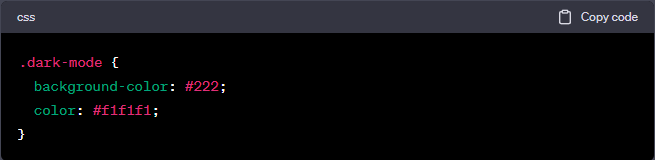
1. Create a Dark Mode CSS Class
Begin by designing a CSS class specifically for Dark Mode, specifying the styles for text and background colors. When Dark Mode is activated, this class will be applied to the elements on your website.
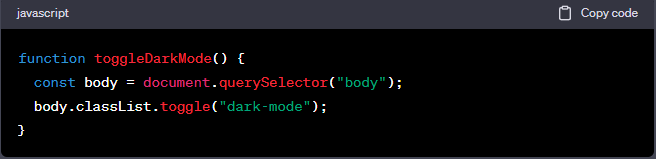
2. Use JavaScript to Toggle Dark Mode
Implement JavaScript to toggle the Dark Mode class on and off. You can achieve this by adding a toggle button on your website or detecting the user’s system preference for Dark Mode.
3. Thorough Testing
After implementing Dark Mode, thoroughly test your website on multiple browsers and devices to ensure a seamless user experience.
Conclusion
Dark Mode is undoubtedly the next big thing in web development. Its popularity stems from the benefits it offers, including reduced eye strain, better accessibility, energy savings, and a modern, stylish appearance that aligns with brand-building efforts. By adopting Dark Mode, small to medium-sized professional service businesses with seven-figure revenues can enhance their online presence and improve user satisfaction.
At Sapere Marketing, we understand the importance of staying ahead in the competitive digital landscape. Our commitment to empowering businesses with effective solutions that perfectly align with their brand and online needs extends to incorporating cutting-edge features like Dark Mode. We ensure that our partners can focus on their core tasks while we take care of their website’s maintenance, security, and optimization.
Remember, your website is the face of your business in the digital world. Embracing Dark Mode can make a significant difference in the user experience, energy efficiency, and brand representation. So, let’s take a step forward together and embrace the exciting possibilities Dark Mode offers for your business’s success!